Klarbefund developer guide
How to build, run, test and change the iPhone app in
clients/ios/. The user guide shows
what a person sees; this guide shows what makes it so. The short command card
is clients/ios/README.md; the work is tracked
in issue #186.
Every screenshot and every number in this guide comes from the app's own fictional development dataset. No real report is involved anywhere in the repository, and the two rules at the end say why that is not negotiable.
1. What you need
| Tool | Version | Why |
|---|---|---|
| macOS with Xcode | Xcode 27, iOS 26 SDK | The app targets iOS 26; the Swift package declares macOS 26 for the tools |
| Swift | 6.0, strict concurrency | Package.swift and project.yml both pin it |
| XcodeGen | brew install xcodegen |
The .xcodeproj is generated from project.yml and never committed |
| Node | as for ui/ |
Only to regenerate the dictionary from services/epa-ingest |
| PlantUML, Graphviz | brew install plantuml |
Only to re-render the diagrams in this guide |
| An iPhone | iOS 26 or later | Only for the camera, Face ID, App Attest and TestFlight; everything else runs in the simulator |
2. How it is put together
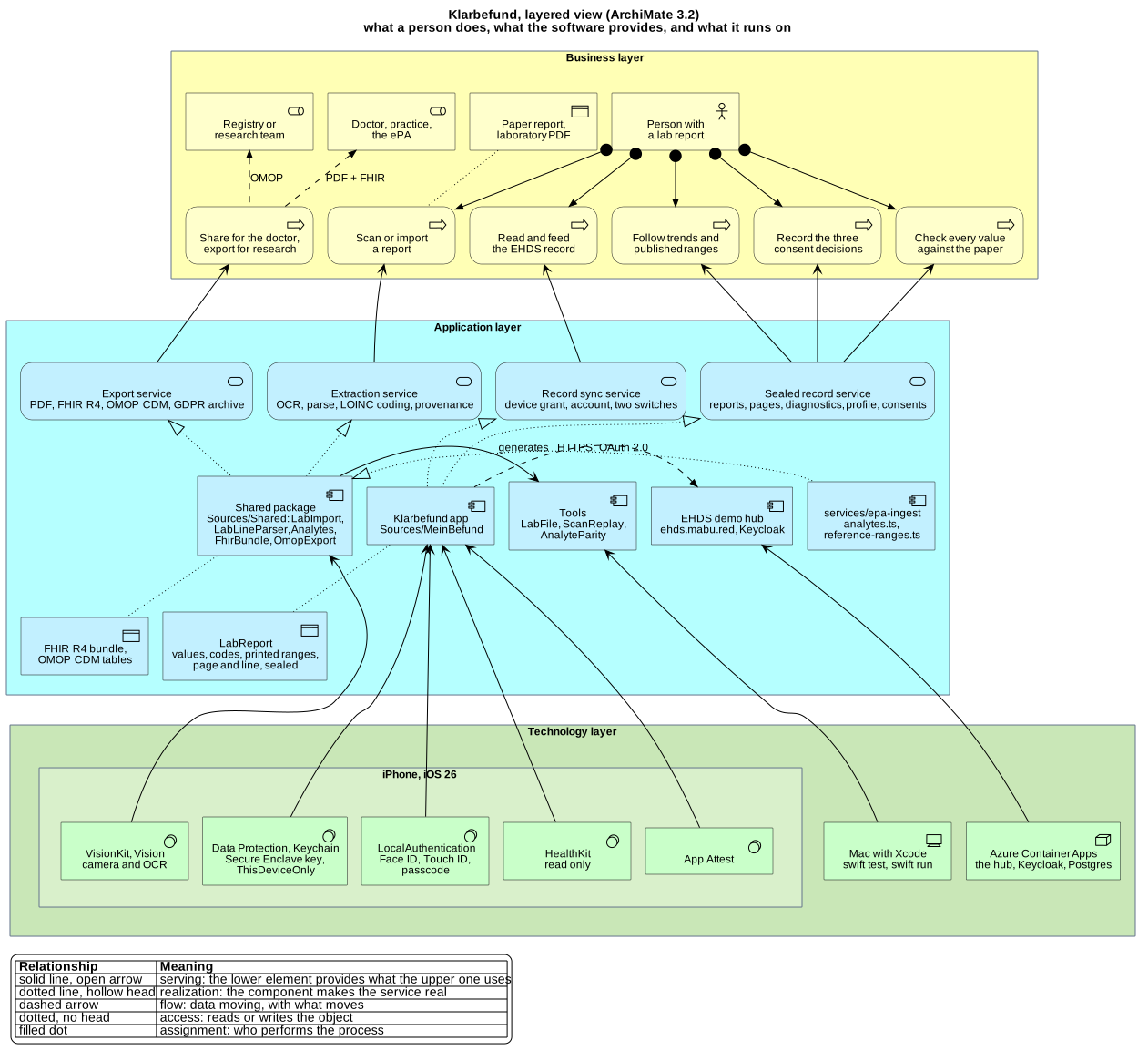
Source: diagrams/klarbefund-architecture.puml,
rendered with scripts/render-plantuml.sh docs/klarbefund/diagrams/*.puml.
The view follows ArchiMate 3.2: the business layer (yellow) holds who does what, the application layer (blue) the services the software provides and the components that realise them, the technology layer (green) what it all runs on. An arrow from a lower band to an upper one means "serves"; a dotted arrow with a hollow head means "realises". Three things to read off it:
Sources/Sharedis a Swift package that compiles for iOS and macOS. It holds the parser, the recogniser's post-processing, the generated analyte dictionary and reference ranges, the record model with its provenance, and the export formats (FHIR R4, OMOP CDM, the diagnostics bundle). Nothing in it touches the network, the Keychain or the store, which is why every number the app computes can be reproduced on a Mac withswift test.Sources/MeinBefundis the app: SwiftUI views, VisionKit scanning, the sealed store, the exports' share sheet, the EHDS connection, the app lock, the analysis providers, and the debug-only demo data and self-test.Tools/are four command-line programs over the Shared package:LabFileimports a PDF or image exactly as the app would,ScanReplayre-runs a diagnostics export through the current parser,AnalyteParityproves the generated dictionary equals its TypeScript source, andIconGendraws the app icon.
clients/ios/
  project.yml                    XcodeGen spec: the Shared framework and the MeinBefund app
  Package.swift                  SwiftPM: Shared, the four tools, SharedTests
  Sources/Shared/                parser, provenance model, formats; *.generated.swift are generated
  Sources/MeinBefund/            the app; en.lproj and de.lproj hold the strings
  Tools/{LabFile,ScanReplay,AnalyteParity,IconGen}/
  Tests/SharedTests/             Swift Testing: what the app computes
  Tests/UITests/                 XCUITest: what it shows, and what a tap does
  Scripts/                       build, install, upload, screenshots, localisation, CodeQL
  appstore/                      App Store Connect texts and the screenshot upload
3. Build and run
cd clients/ios
brew install xcodegen                          # once
swift test                                     # the Shared package, on the Mac
swift run AnalyteParity                        # the generated table agrees with its source
xcodegen generate && open MeinBefund.xcodeproj # then run the MeinBefund scheme in Xcode
From the command line into a simulator, note the ad-hoc signature:
without it every Keychain call fails with -34018 and the store cannot
create its key.
xcodebuild -project MeinBefund.xcodeproj -scheme MeinBefund \
  -sdk iphonesimulator -destination 'platform=iOS Simulator,name=iPhone 17 Pro' \
  CODE_SIGN_IDENTITY="-" CODE_SIGNING_REQUIRED=YES build
Onto a connected iPhone: Scripts/install-device.sh. The generated project
carries no signing team, so a plain xcodebuild for a device fails; the
script supplies one from TEAM_ID or from the keychain, and installs what it
built. TestFlight: Scripts/archive-and-upload.sh; its header names the four
things that must exist in the Apple Developer account first. The version is
pinned in project.yml: MARKETING_VERSION matches the App Store Connect
record and CURRENT_PROJECT_VERSION rises with every upload, because App
Store Connect refuses a build number it has already seen, after the upload.
4. Demo data and launch arguments
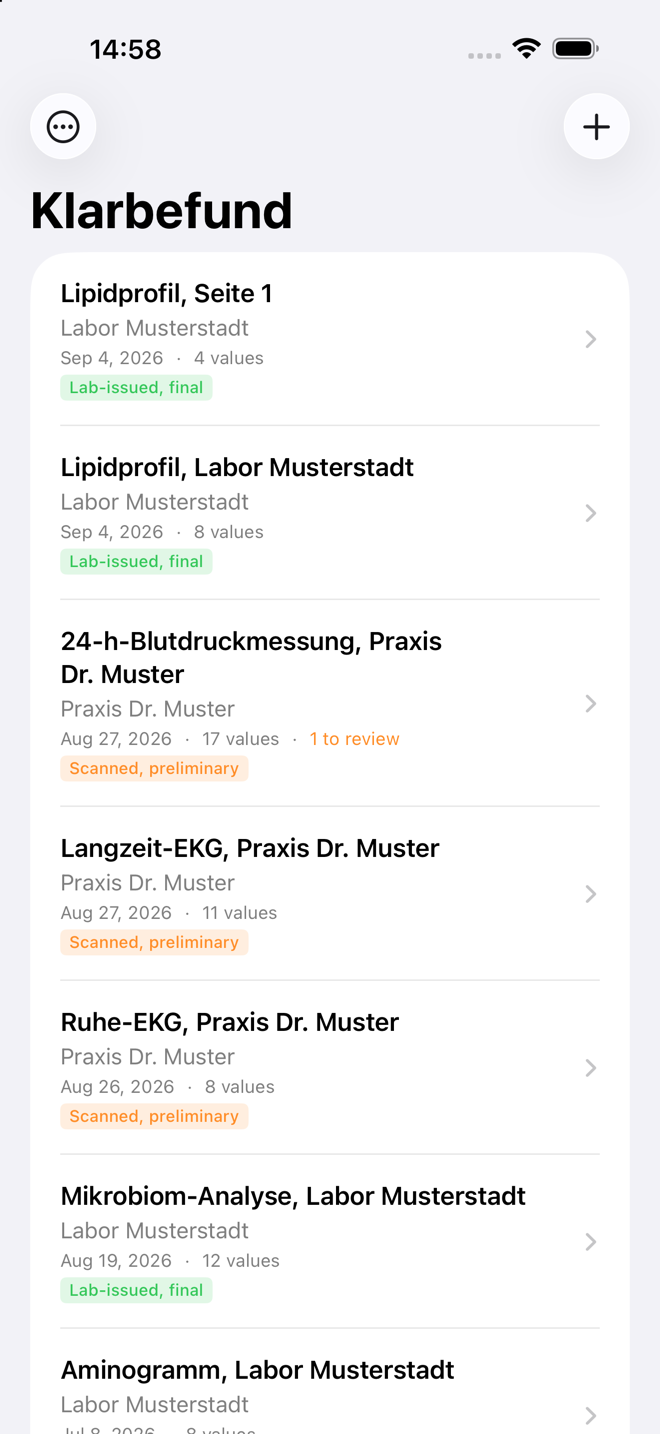
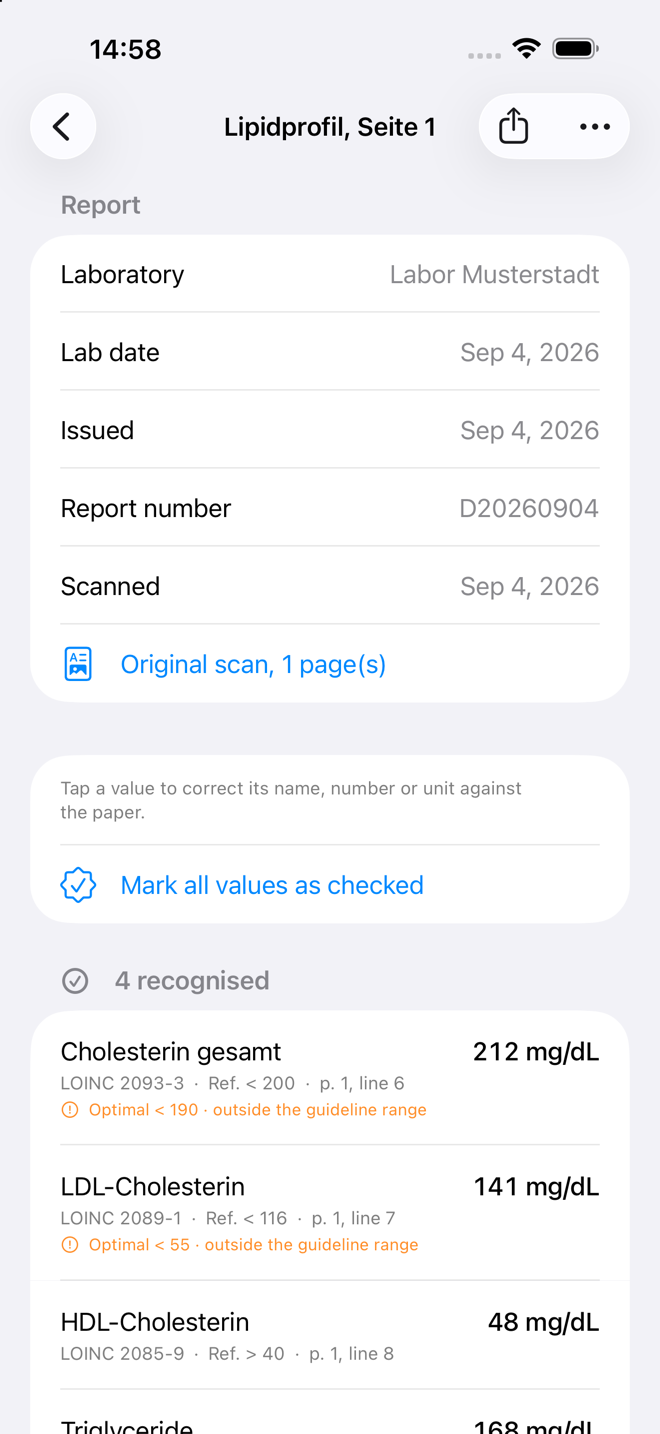
Every launch argument below exists only in a Debug build. The checks are
#if DEBUG, not a flag alone: a flag can be discovered, code that is not
compiled cannot.
| Argument | What it does |
|---|---|
-MBDemoSeed |
Two fictional reports, in memory only. Enough for a screenshot; what every UI test launches with. |
-MBDevData |
Seven fictional reports across three years and four sources, built in code: a trend has shape, the unmatched list has rows, every report has pages. |
-MBShot <screen> |
Opens a screen directly once the reports are loaded: list detail scan trends reference history profile consent settings privacy consents connect. |
-MBSelfTest |
Drives one synthetic report through the whole pipeline in the app target and logs 27 checks (see The self-test). |
-MBExportDiagnostics |
Builds the diagnostics archive into the app's temporary directory for Scripts/pull-diagnostics.sh. |
The dev dataset is built, not stored. A row states the label, the value,
the unit and the range the laboratory printed, and Analytes.lookup codes it
exactly as it codes a scan. No code in the dataset can be wrong, a row the
dictionary cannot code lands in the unmatched list of its own accord, and the
dataset follows the dictionary when the dictionary changes. The pages are
drawn by SyntheticSheet, the same renderer the tests read.
A demo launch never locks: the app lock reads the seed flag and stays open, so the UI tests and the screenshot script run where nobody can answer a passcode prompt. On a release build neither the flag nor the exception exists.
Screenshots for the documentation and the App Store come from one script, which launches each screen by argument rather than by scripted taps, so a re-shoot after a layout change needs no new coordinates:
SEED=-MBDevData OUT=/tmp/shots SCREENS="list detail trends" Scripts/capture-screenshots.sh
Scripts/capture-screenshots.sh                 # the App Store set, size-checked, into appstore/screenshots/en
5. From the camera to the store
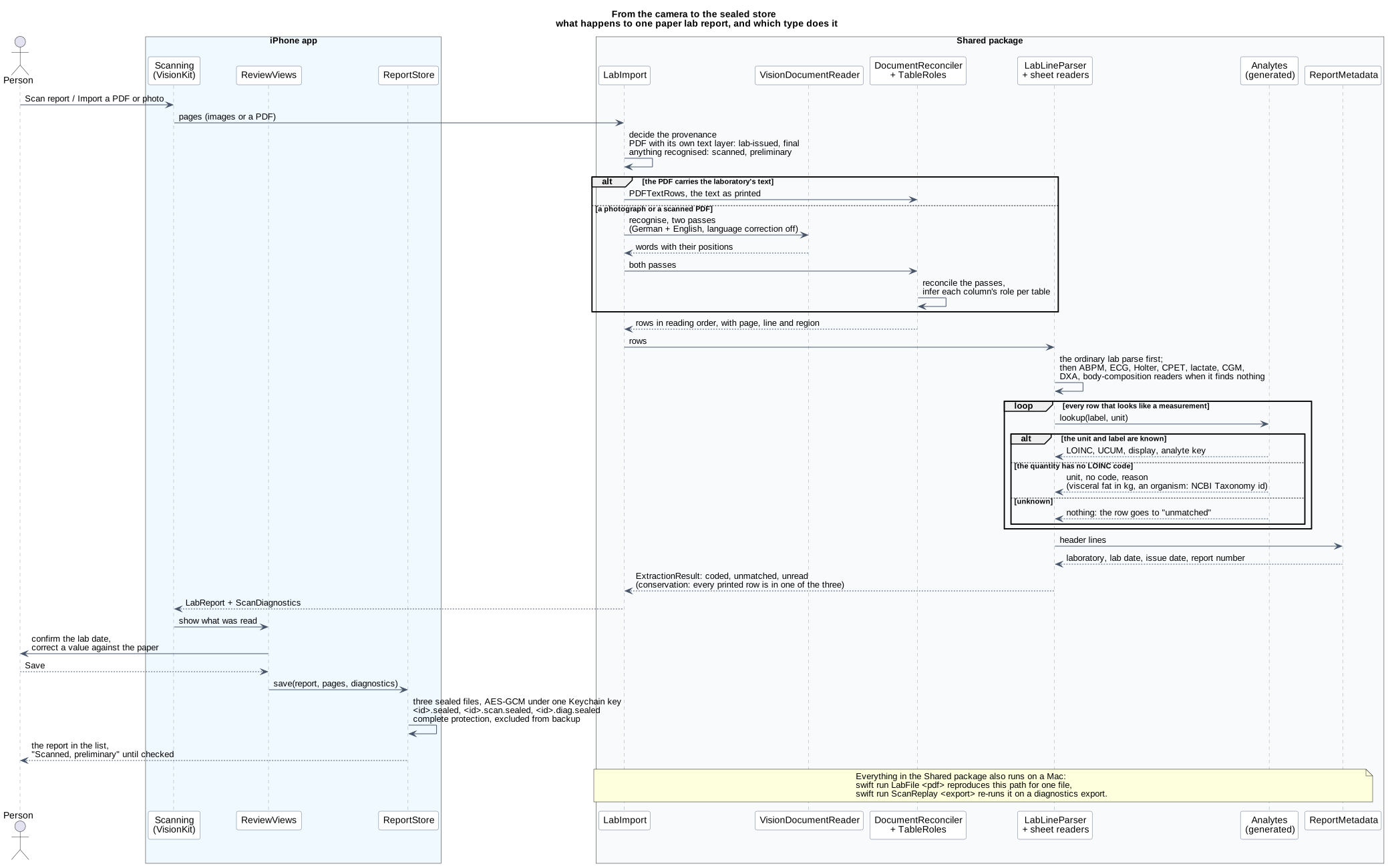
Source: diagrams/klarbefund-scan-pipeline.puml.
The order is fixed and each step has one owner (ADR-033):
- Provenance first.
LabImportdecides on the file, never its extension: a PDF carrying the laboratory's own text layer islab-issued-digitaland its Observations arefinal; anything that has to go through the recogniser isocr-transcribedandpreliminary. It is strict on purpose, because marking a transcriptionfinalis the failure that matters. - Recognition.
VisionDocumentReaderruns two Vision passes, German and English, with language correction off: "correcting"Lp(a)or a decimal comma is actively harmful.DocumentReconcilermerges the passes andTableRolesinfers which column holds the label, the value, the unit and the range, per table. - Parsing.
LabLineParserreads every row. When the ordinary parse finds nothing, the sheet readers take their turn: ambulatory blood pressure, resting and exercise ECG, Holter, cardiopulmonary exercise test, lactate, CGM glucose profile, DXA, and a body-composition scale's screen, which is a dashboard and not a report and is read for its headline value only. - Coding.
Analytes.lookup(label, unit)picks the LOINC code. The unit decides, never the name alone. A quantity LOINC does not code (visceral fat as a mass, a water ratio) is carried with its unit, no code and a required reason; an organism from a stool report carries its NCBI Taxonomy id, because LOINC names tests and not organisms. - The header.
ReportMetadataandPrintedFieldsread the laboratory, the lab date, the issue date and the report number from the sheet; the lab date is preferred over the receipt and issue dates and the person confirms it before saving. - Conservation. Every row that looks like a measurement ends up coded,
unmatched or unread. A row in none of the three is indistinguishable from
a row that was never printed, and that is exactly how an HbA1c row went
missing once (
docs/gotchas.md, 2026-09-19). The self-test asserts it. - Review and save.
ReviewViewsshows what was read;ReportStoreseals it.
swift run LabFile ~/Downloads/befund.pdf runs steps 1 to 6 on a Mac and
prints the provenance, the header, and every row as coded, unmatched or
unread; --values adds the numbers, --rows adds the recogniser's layout.
It refuses a path inside this repository.
6. The store and the lock
Three sealed files per report under Application Support/Reports, each
AES-GCM under the same Keychain key, complete file protection, excluded from
backup:
<id>.sealed         the record (LabReport)
<id>.scan.sealed    the pages as one PDF
<id>.diag.sealed    the scan's diagnostics (ScanDiagnostics)
profile.sealed      sex, date of birth, height (Profile)
consents.sealed     the three consent decisions (ConsentLedger)
The key is ThisDeviceOnly and unavailable while the phone is locked, so a
container copy yields ciphertext and the system's own snapshot of the app
fails with EPERM; SecurityPostureTests pins the build settings and the
self-assessment records the measurement. Records
written before a field existed still decode: every later field is optional or
defaulted.
The app lock (ADR-060)
is two types. AppLockPolicy in Shared decides whether a challenge is due
and is pure, so AppLockPolicyTests runs on a Mac; AppLock in the app asks
LocalAuthentication how, Face ID, Touch ID or the passcode, and
PrivacyCover draws the cover the app switcher sees. The same ADR says why
certificate pinning and jailbreak detection were declined.
7. The dictionary is generated, never copied
Sources/Shared/Analytes.generated.swift, ReferenceRanges.generated.swift
and PromptText.generated.swift are produced from
services/epa-ingest:
cd services/epa-ingest && npm run generate:swift
cd clients/ios && swift run AnalyteParity      # 1589 codings, 71 units today
Do not hand-edit them. Add an analyte to analytes.ts or a range to
reference-ranges.ts, regenerate, commit both. CI fails when a generated file
is out of date with its source, because a stale copy is exactly the silent
divergence the monorepo was chosen to prevent: an iPhone coding Lp(a) one way
and the ingest service another, noticed when a value reaches a doctor.
The reference-range generator refuses a range whose analyte the dictionary does not know or whose unit that analyte is not defined in. Only analytes with a citable published source get a band (ADR-039); for every other analyte the Trends screen draws the range the person's own laboratory printed.
8. Tests, and what each is for
swift test                                     # Swift Testing: what the app computes
Scripts/run-ui-tests.sh                        # XCUITest: what it shows, and what a tap does
swift test --filter ExtractionAccuracyTests    # the accuracy benchmark, JSON to docs/klarbefund/accuracy-benchmark.json
swift test --filter SecurityPostureTests       # the build settings the self-assessment relies on
The unit suite (Tests/SharedTests/) is the larger one and catches what
can be reasoned about: a unit that picks the wrong code, a date read from the
wrong line, an export column in the wrong place. FhirBundleParityTests pins
the bundle to the golden bundle services/epa-ingest writes, so both writers
emit the same FHIR for the same sheet.
The UI suite (Tests/UITests/) exists because the unit suite caught none
of the last several defects: a card clipped at the chart's edge, a selection
that forgot itself on the next render, LOINC Optional("2093-3") on the one
screen a person compares with their own paper. Every test launches with
-MBDemoSeed and reaches its screen with -MBShot, so it breaks when what it
checks changes and not when a button moves. Three things learned the hard way
are in docs/gotchas.md: an accessibilityIdentifier on a container renames
everything inside it; a Button whose label is Color.clear is not in the
accessibility tree; Swift Charts' selection answers a finger and not a
synthesised tap, so real buttons sit over the marks.
8.1 The self-test
Everything after the camera runs in the app target and therefore not in
swift test: the sealed store, the PDF of the pages, the export. -MBSelfTest
drives one synthetic report through the whole chain and logs each of its 27
checks: recognition and coding, a citation per value, the lab date read from
the header, the pages as a PDF, the three sealed files decrypting, the replay
of the diagnostics record reproducing the extraction exactly, the archive
building, and the doctor export fitting the ePA's 25 MB with the pages
appended.
xcrun simctl launch <udid> red.mabu.meinbefund -MBSelfTest
xcrun simctl spawn <udid> log show --last 2m --predicate 'subsystem == "red.mabu.meinbefund"' --style compact
8.2 The accuracy benchmark
ExtractionAccuracyTests reads synthetic sheets of known content and writes
field-level accuracy to docs/klarbefund/accuracy-benchmark.json; the
evidence page quotes it and run-on-mac
reproduces every number. A real report is measured the same way, on the
person's own Mac and never in the repository, with ScanReplay --truth
against a hand-written truth.json beside the export: it prints which fields
of which rows were wrong, never the values.
9. Debugging a misread sheet
The store yields ciphertext, so evidence leaves the phone through the app's own Export diagnostics, which asks for confirmation in words and hands a zip to the share sheet (ADR-038):
klarbefund-diagnostics-<date>/
  about.json                 build, device, dictionary size, counts
  log.txt                    this session's log lines: counts and codes only
  <title>-<id8>/
    report.json              the stored record: values, metadata, page text
    diagnostics.json         both Vision passes, the reconciled rows, the layout
    scan.pdf                 the pages as scanned
With the phone on USB and a Debug build installed,
Scripts/pull-diagnostics.sh does the export and the unzip in one go, under
~/Downloads. Unzip outside this repository, then:
swift run ScanReplay ~/Downloads/klarbefund-diagnostics-<date>          # every report, with the current parser
swift run ScanReplay ~/Downloads/klarbefund-diagnostics-<date> --ocr    # re-run Vision on scan.pdf
swift run ScanReplay ~/Downloads/klarbefund-diagnostics-<date> --truth  # accuracy against truth.json
The replay prints what the phone coded, what codes now, what is newly coded
or lost, and every row with its reason. Add an analyte to analytes.ts,
regenerate, replay, and watch the real sheet's rows move from unmatched to
coded without scanning it again. Both tools refuse a path inside
clients/ios/.
10. The connection to the EHDS hub
The patient screen of the hub starts an OAuth 2.0 device grant for the public
Keycloak client klarbefund-app and shows it as a QR code carrying a
klarbefund://connect link; the app polls Keycloak for the token and
registers with the hub
(ADR-049).
Shared/EHDSConnect.swift: the link, refused unless its hub and issuer are onTrustedHub.production(plus.developmentin a debug build), and the poller with its four answers.EHDSConnectTestscovers each.EHDSConnection.swift: tokens and a device id in the Keychain asThisDeviceOnly, refresh, register, read the record, disconnect (which revokes the refresh token at Keycloak), and the two sync switches.ConnectView.swift: the sheet, VisionKit's data scanner for QR codes only, a paste field, and "Is this your account?".- Create an EHDS account (ADR-054) calls the two routes on the hub that answer without a session; the account is created only for a request whose Apple App Attest attestation verifies, which is why the simulator shows the button disabled with its reason.
- Send my reports and Send my device trends (ADR-057) post to the person's own record; the record itself holds reports, vaccinations and the medication plan (ADR-059).
ConnectUITestsandAccountUITestsrun againstDemoEHDSTransportunder-MBDemoSeed;LiveConnectUITestsandLiveAccountUITestsrun against a real hub when given a fresh link (docs/knowledge/runbooks/klarbefund-connect.md).
11. Exports
| Action | Writer | Contents |
|---|---|---|
| Share for my doctor | ReportExport, FhirBundle |
PDF summary with the original pages appended, plus a FHIR R4 bundle |
| Export for research (OMOP) | OmopExport |
OMOP CDM v5.4 measurement.csv, person.csv, observation_period.csv |
| Export all my data | DataExport |
every report, page, value, profile field and consent, as JSON and PDFs |
| Export diagnostics | DiagnosticsBundle |
the record, both Vision passes, the pages, the session log |
The OMOP tables carry measurement_concept_id = 0 throughout, deliberately:
mapping LOINC to an OMOP concept needs the Athena vocabulary, which is not on
a phone, and inventing an id would put a wrong identifier on a real
measurement. The printed range is kept verbatim in RawLabValue.referenceText
and travels as referenceRange.text; a range with no number in it survives
only there, and FHIR's rng-2 allows that.
12. Languages
English is the base, German the translation, following the phone's language.
Scripts/check-localization.sh fails when a user-visible string has no
German or when a German sentence was left in the English base; it uses
xcodebuild -exportLocalizations, the same extractor Xcode's editor uses, so
it sees SwiftUI Text literals and INFOPLIST_KEY_* values that no grep of
the sources would find. The camera permission prompt once shipped in German to
every English phone, which is why the script exists.
13. Static analysis and CI
Scripts/codeql-swift.sh # CodeQL on the app and Shared, about 15 minutes
CodeQL needs a real build to see Swift, so on GitHub it runs only when
clients/ios/ changes (.github/workflows/codeql-swift.yml), on a macOS
runner. The codeql-swift pre-push hook runs the same suite when a push
changes the Swift sources; it exits 1 on any finding not listed, with its
reason, in Scripts/codeql-accepted.txt. Swift needs a macOS runner, which
has lower concurrency than Linux, so the iOS job is path-filtered to
clients/ios/** and never gates the web or service suites; conversely, the
ui/** and services/** workflows exclude clients/ios/**.
The security posture of the app, its threat model and what an independent test would add are in the threat model, the security test report and the self-assessment.
14. Two rules that are not negotiable
- No health data in
clients/ios/, ever. No lab reports, no scans, no exported HealthKit archives, no screenshots containing real values, not even temporarily, not even gitignored. Test fixtures are synthetic, the wayservices/epa-ingest/__tests__/fixtures/already is. The tools refuse a path inside the repository for the same reason. - No real organisation in demo content.
CLAUDE.mdforbids it outside theNEXT_PUBLIC_DEMO_TKflag. The study this app is built for is real; the demo centre, the laboratory and the practice in the dev dataset are fictional.
15. Where the decisions are
| ADR | Decides |
|---|---|
| ADR-033 | The extraction pipeline and its order |
| ADR-038 | Diagnostics kept with the scan, exported on request |
| ADR-039 | Only citable published ranges, beside the laboratory's own |
| ADR-049 | Connecting by OAuth device grant and QR code |
| ADR-050 | The beta by public TestFlight link |
| ADR-054 | Creating an account, gated by App Attest |
| ADR-057 | Sending weekly device means, behind a switch of its own |
| ADR-059 | What the record holds |
| ADR-060 | The app lock; pinning and jailbreak detection declined |